
Photo-archiving, formatting memory cards, and heartache
I had another post intended for today, but I recently encountered an unexpected (and theoretically preventable) problem with my camera, so I figured I’d pass the information on to you all, and save you a bit heartache at my own expense.
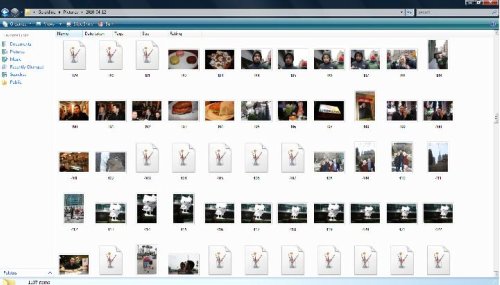
But first, a little bit of self-promotion. I recently wrote an article for cozi.com about digital photo archiving, and it’s worth a gander, especially if you take a lot of photos. Basically, I took apart Real Simple’s advice on storing images (they suggest taking them all off your hard-drive and -GASP- burning them onto a CD. Which is a recipe for disaster). Naturally, since I keep all of my photos in several locations – both on my hard-drive and on a Flickr account – I figured I was safe. I didn’t consider that there could be problems with the memory card inside of my camera that could be causing me problems. But low and behold, there were problems. Serious ones. When I went through my pictures from the last few trips, I found saw this:
Damn it.
–
See all those little white icons with the paintbrushes on them? Every single one of those is an unreadable file. At the point, I can’t quite figure out if they’re just old files that I’ve already uploaded (that weren’t quite deleted off the memory card) or if they actually are new photos that were corruptd. I suspect it’s the latter, as I can’t find a few pictures that I know I took. The whole thing is heart-breaking, and I’m trying to pretend that it didn’t really happen.
It looks like it’s a common occurrence, though. There’s plenty of online forums that address the issue, and a few sites let you download software that will hopefully help you read your corrupt files. Most of the answers I saw were that you need to reformat your card in your camera, which can be done easily from the Menu page of your camera’s settings. Of course, I did so, but it was too late.
So I’m passing on this info to all of you. It seems like an important thing to know: always reformat your memory camera in your camera.







Leave a Comment